Barcode with Preview
Same scanning setup as Minimal Barcode, plus a live camera preview so the user can see what they are aiming at. The preview comes from AilaCaptureView, a UIKit view the SDK provides, wrapped for SwiftUI with UIViewRepresentable.
Folder in the download: BarcodeWithPreview/. Scheme: BarcodeWithPreview.
What you'll see
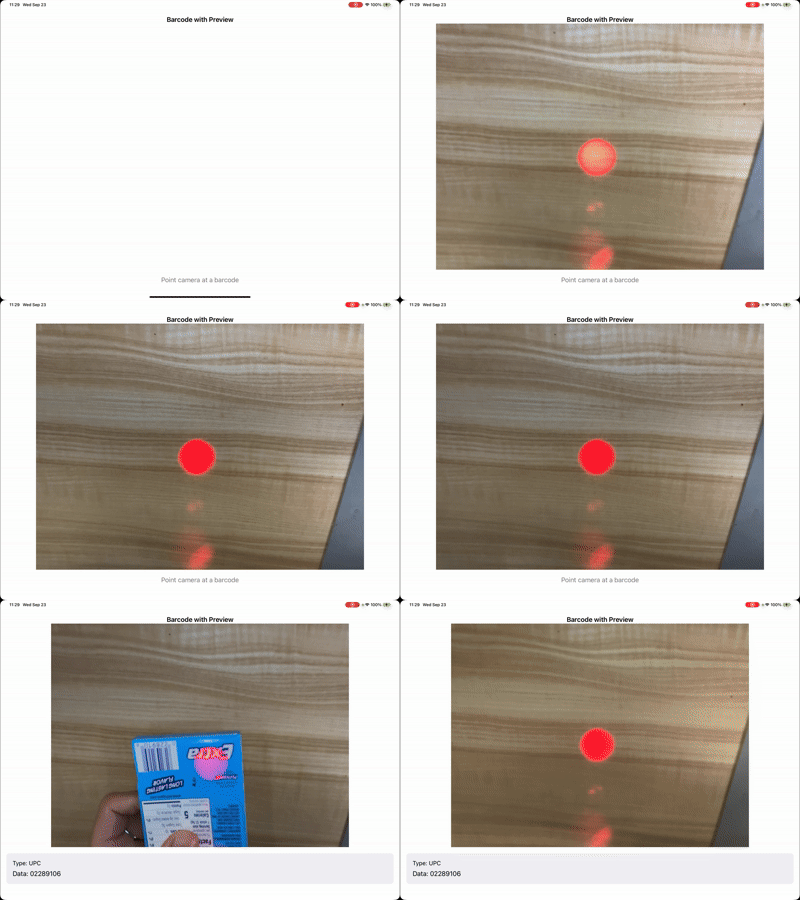
How it works
The preview wrapper. AilaCaptureView is a UIView, so SwiftUI needs a UIViewRepresentable to host it. The wrapper creates the view, sets videoGravity to .resizeAspectFill so the feed fills its frame, and does nothing else. The SDK attaches the camera session to it automatically once Aila_Start() runs.
//
//  Quickstart: Barcode with Preview – AilaCaptureView integration
//  Wraps AilaCaptureView (UIKit) for SwiftUI to show the camera preview.
//

import SwiftUI
import AVFoundation
import Aila

struct AilaCaptureViewRepresentable: UIViewRepresentable {
    func makeUIView(context: Context) -> AilaCaptureView {
        let view = AilaCaptureView()
        view.videoGravity = .resizeAspectFill
        return view
    }

    func updateUIView(_ uiView: AilaCaptureView, context: Context) {
        uiView.videoGravity = .resizeAspectFill
    }
}
BarcodeWithPreview/ViewModel.swift
//
//  Quickstart: Barcode with Preview – ViewModel
//  Same Aila configuration as Minimal Barcode (default barcode symbologies only).
//

import Foundation
import Aila

final class BarcodeWithPreviewViewModel: ObservableObject {
    @Published private(set) var lastScannedData: String?
    @Published private(set) var lastScannedType: String?

    var hasScanResult: Bool {
        lastScannedData != nil && lastScannedType != nil
    }

    func startScanning() {
        Aila_Init()
        Aila_SetConfiguration(buildConfiguration())
        Aila_Start()
    }

    func stopScanning() {
        Aila_Stop()
    }

    private func buildConfiguration() -> AilaConfiguration {
        let config = AilaConfiguration()
        config.multiScanMode = .off
        config.beepVolume = .volume3

        config.setCode(.typeUPC, enabled: true)
        config.setCode(.typeEAN, enabled: true)
        config.setCode(.typeQR, enabled: true)
        config.setCode(.type128, enabled: true)
        config.setCode(.typePDF417, enabled: true)

        config.scanCallback = { [weak self] results in
            self?.handleScanResults(results)
        }

        return config
    }

    private func handleScanResults(_ results: [AilaScanObject]?) {
        guard let results = results, !results.isEmpty else { return }
        let first = results[0]
        let data = first.data ?? "no data"
        let type = first.typeDescription() ?? "no type"

        print("Scanned — type: \(type), data: \(data)")

        DispatchQueue.main.async { [weak self] in
            self?.lastScannedData = data
            self?.lastScannedType = type
        }
    }
}
BarcodeWithPreview/View.swift
//
//  Quickstart: Barcode with Preview – View
//  Integrates AilaCaptureView (camera preview) with default barcode scanning.
//

import Foundation
import SwiftUI

struct BarcodeWithPreviewView: View {
    @StateObject private var viewModel = BarcodeWithPreviewViewModel()

    var body: some View {
        VStack(spacing: 0) {
            Text("Barcode with Preview")
                .font(.headline)
                .padding(.top, 8)

            AilaCaptureViewRepresentable()
                .aspectRatio(4/3, contentMode: .fit)
                .clipped()
                .padding(.horizontal)

            if viewModel.hasScanResult, let data = viewModel.lastScannedData, let type = viewModel.lastScannedType {
                scanResultView(data: data, type: type)
            } else {
                placeholderView
            }
        }
        .padding(.bottom)
        .onAppear {
            viewModel.startScanning()
        }
        .onDisappear {
            viewModel.stopScanning()
        }
    }

    private func scanResultView(data: String, type: String) -> some View {
        VStack(alignment: .leading, spacing: 8) {
            Text("Type: \(type)")
                .font(.subheadline)
            Text("Data: \(data)")
                .font(.body)
                .lineLimit(5)
        }
        .frame(maxWidth: .infinity, alignment: .leading)
        .padding()
        .background(Color(.systemGray6))
        .cornerRadius(8)
        .padding(.horizontal)
        .padding(.top, 16)
    }

    private var placeholderView: some View {
        Text("Point camera at a barcode")
            .foregroundStyle(.secondary)
            .padding(.top, 16)
    }
}
You can size and position AilaCaptureView however you like. Scanning does not depend on the preview being visible or full-screen. The preview exists for the user, not the decoder.
Try changing
- Swap
.resizeAspectFillfor.resizeAspectto letterbox the feed instead of cropping it. - Remove the
aspectRatiomodifier and let the preview fill the available height.
API used
Next: scan several codes in one session with Multi-Scan.
Want the code? The full Xcode project is available as a zip on the Quickstarts overview.