Minimal Barcode
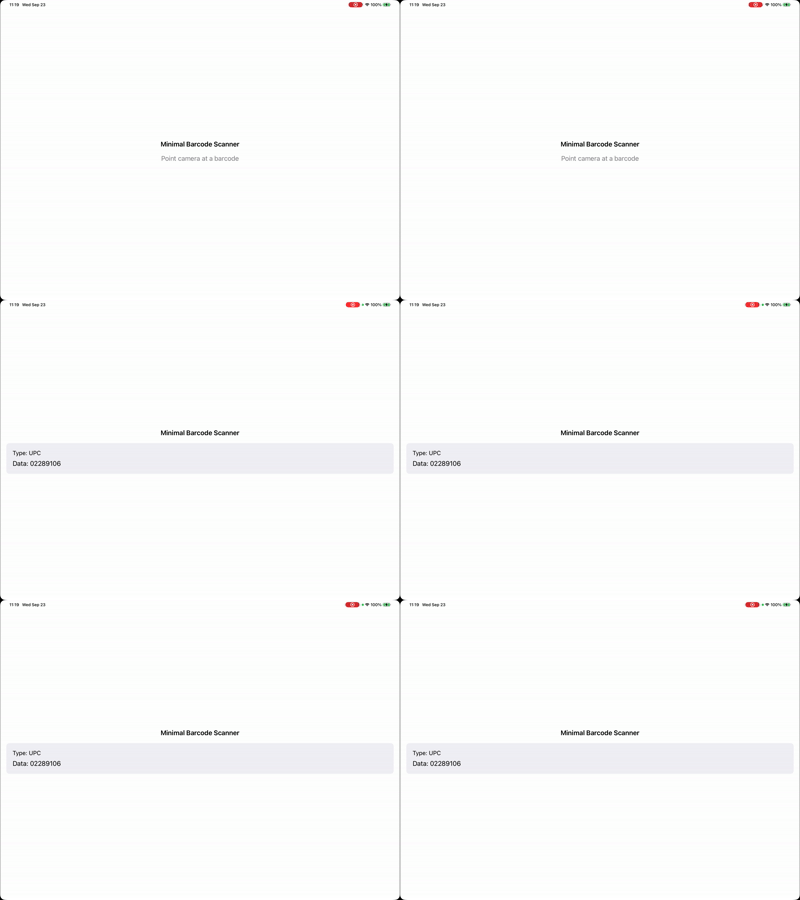
This is the "hello world" of the Aila SDK. It initializes the SDK, turns on a handful of common symbologies, and shows the type and data of the last barcode scanned. There is no camera preview on screen. The SDK runs the camera itself and delivers results through a callback.
Folder in the download: MinimalBarcode_HelloWorld/. Scheme: MinimalBarcode.
What you'll see
How it works
Three calls do all the work, and they happen in startScanning():
Aila_Init()sets up the SDK. It is safe to call more than once.Aila_SetConfiguration(_:)takes anAilaConfigurationdescribing which symbologies to decode and what to do with results.Aila_Start()opens the camera and begins scanning.Aila_Stop()instopScanning()releases it.
The configuration turns multi-scan off so each barcode is reported once, sets a beep volume, and enables UPC, EAN, QR, Code 128, and PDF417 with setCode(_:enabled:). Add or remove symbologies there to match your use case. The full list is in Supported Formats.
The scanCallback receives an array of AilaScanObject. This quickstart reads the first one, pulls out data and typeDescription(), and publishes them to the view. Note the DispatchQueue.main.async: the callback can arrive on a background thread, so any UI state update has to hop to the main thread.
import Foundation
import Aila

final class MinimalBarcodeViewModel: ObservableObject {
    @Published private(set) var lastScannedData: String?
    @Published private(set) var lastScannedType: String?

    var hasScanResult: Bool {
        lastScannedData != nil && lastScannedType != nil
    }

    func startScanning() {
        Aila_Init()
        Aila_SetConfiguration(buildConfiguration())
        Aila_Start()
    }

    func stopScanning() {
        Aila_Stop()
    }

    private func buildConfiguration() -> AilaConfiguration {
        let config = AilaConfiguration()
        config.multiScanMode = .off
        config.beepVolume = .volume3

        // add or remove barcode symbologies here
        config.setCode(.typeUPC, enabled: true)
        config.setCode(.typeEAN, enabled: true)
        config.setCode(.typeQR, enabled: true)
        config.setCode(.type128, enabled: true)
        config.setCode(.typePDF417, enabled: true)

        config.scanCallback = { [weak self] results in
            self?.handleScanResults(results)
        }

        return config
    }

    private func handleScanResults(_ results: [AilaScanObject]?) {
        guard let results = results, !results.isEmpty else { return }
        let first = results[0]
        let data = first.data ?? "no data"
        let type = first.typeDescription() ?? "no type"

        print("Scanned — type: \(type), data: \(data)")

        DispatchQueue.main.async { [weak self] in
            self?.lastScannedData = data
            self?.lastScannedType = type
        }
    }
}
MinimalBarcode_HelloWorld/View.swift
import Foundation
import SwiftUI

struct MinimalBarcodeView: View {
    @StateObject private var viewModel = MinimalBarcodeViewModel()

    var body: some View {
        VStack(spacing: 16) {
            Text("Minimal Barcode Scanner")
                .font(.headline)

            if viewModel.hasScanResult, let data = viewModel.lastScannedData, let type = viewModel.lastScannedType {
                scanResultView(data: data, type: type)
            } else {
                placeholderView
            }
        }
        .padding()
        .onAppear {
            viewModel.startScanning()
        }
        .onDisappear {
            viewModel.stopScanning()
        }
    }

    private func scanResultView(data: String, type: String) -> some View {
        VStack(alignment: .leading, spacing: 8) {
            Text("Type: \(type)")
                .font(.subheadline)
            Text("Data: \(data)")
                .font(.body)
                .lineLimit(5)
        }
        .frame(maxWidth: .infinity, alignment: .leading)
        .padding()
        .background(Color(.systemGray6))
        .cornerRadius(8)
    }

    private var placeholderView: some View {
        Text("Point camera at a barcode")
            .foregroundStyle(.secondary)
    }
}
Try changing
- Enable
.typeDataMatrixor.typeAztecinbuildConfiguration()and scan a 2D code. - Set
config.beepVolume = .volumeOffto scan silently. - Log every result instead of only the first by iterating
resultsinhandleScanResults.
API used
Next: add a camera preview in Barcode with Preview.
Want the code? The full Xcode project is available as a zip on the Quickstarts overview.