MRZ Scanning
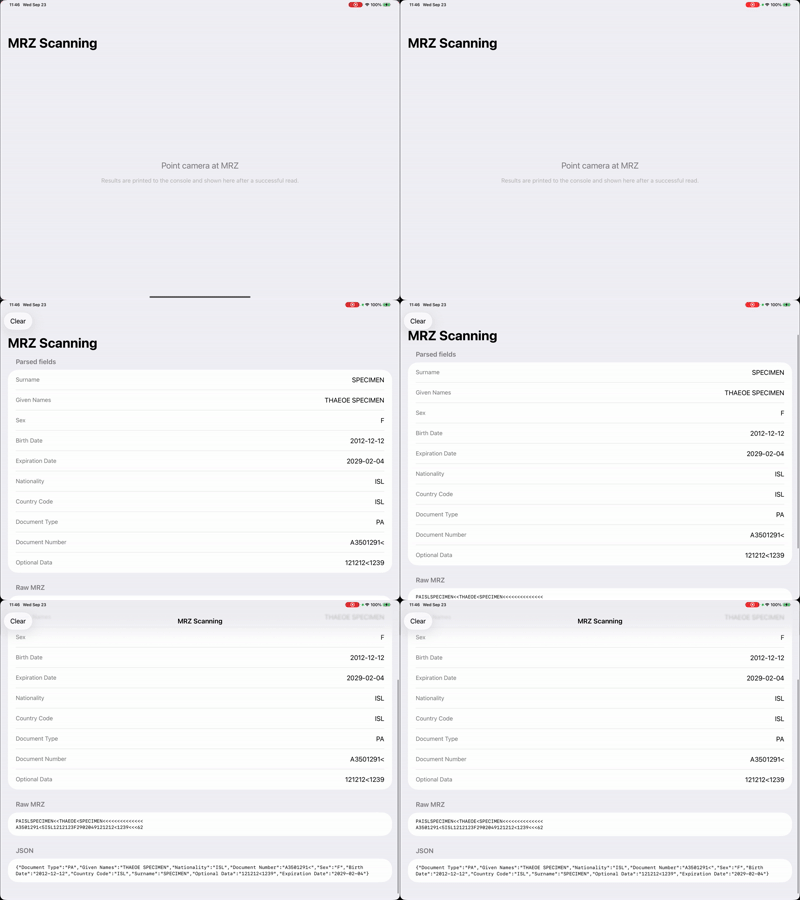
The machine readable zone (MRZ) is the two or three lines of OCR text at the bottom of a passport or the back of an ID card. This quickstart turns on MRZ mode, waits for a read, and shows the parsed fields, the raw MRZ lines, and the JSON the SDK returned.
Folder in the download: MRZScanning/. Scheme: MRZScanning. No camera preview. See MRZ with Guides for the version with one.
MRZ scanning needs the MRZ feature in your organization's license. Without it the app still runs and scans barcodes, but MRZ reads are not returned. See Licensing on the overview page.
What you'll see
How it works
Enabling MRZ. One line in buildConfiguration(): config.mrzMode = .on. Barcode symbologies stay enabled alongside it, so the same screen can read either.
Recognizing an MRZ result. In the callback, MRZ reads arrive as AilaScanObject with type == .typeMRZ. Casting to AilaMRZScanObject gives access to rawData, the MRZ text as printed on the document.
Parsing the data. The data property of an MRZ result is a JSON string. MRZResult.from(data:rawData:) decodes it with JSONSerialization and pulls out the keys the SDK provides: Surname, Given Names, Sex, Birth Date, Expiration Date, Nationality, Country Code, Document Type, Document Number, and the optional data fields. Empty values are skipped.
//
//  Quickstart: MRZ Scanning – ViewModel
//  MRZ: read and parse MRZ
//

import Foundation
import Aila

/// Aila returns MRZ as JSON in `data` you can also use the optional `rawData` from AilaMRZScanObject
struct MRZResult: Identifiable {
    let id = UUID()
    let rawData: String?
    let parsedFields: [(String, String)]
    let jsonString: String

    static func from(data: String, rawData: String?) -> MRZResult {
        var fields: [(String, String)] = []
        if let utf8 = data.data(using: .utf8),
           let dict = try? JSONSerialization.jsonObject(with: utf8) as? [String: Any] {
            let keys = [
                "Surname", "Given Names", "Sex", "Birth Date", "Expiration Date",
                "Nationality", "Country Code", "Document Type", "Document Number",
                "Optional Data", "Optional Data 2"
            ]
            for key in keys {
                if let value = dict[key] as? String, !value.isEmpty {
                    fields.append((key, value))
                }
            }
        }
        let effectiveRaw: String? = (rawData?.isEmpty == false) ? rawData : nil
        return MRZResult(rawData: effectiveRaw, parsedFields: fields, jsonString: data)
    }
}

final class MRZScanningViewModel: ObservableObject {
    @Published private(set) var lastMRZResult: MRZResult?

    func startScanning() {
        Aila_Init()
        Aila_SetConfiguration(buildConfiguration())
        Aila_Start()
    }

    func stopScanning() {
        Aila_Stop()
    }

    func clearResult() {
        lastMRZResult = nil
    }

    private func buildConfiguration() -> AilaConfiguration {
        let config = AilaConfiguration()
        config.multiScanMode = .off
        config.beepVolume = .volume3
        config.mrzMode = .on

        config.setCode(.typeUPC, enabled: true)
        config.setCode(.typeEAN, enabled: true)
        config.setCode(.typeQR, enabled: true)
        config.setCode(.type128, enabled: true)
        config.setCode(.typePDF417, enabled: true)

        config.scanCallback = { [weak self] results in
            self?.handleScanResults(results)
        }

        return config
    }

    private func handleScanResults(_ results: [AilaScanObject]?) {
        guard let results = results, !results.isEmpty else { return }

        for obj in results {
            guard obj.type == .typeMRZ, let data = obj.data else { continue }

            let rawData: String? = (obj as? AilaMRZScanObject)?.rawData
            print("MRZ — data: \(data)")
            if let raw = rawData { print("MRZ — rawData: \(raw)") }

            let mrzResult = MRZResult.from(data: data, rawData: rawData)
            DispatchQueue.main.async { [weak self] in
                self?.lastMRZResult = mrzResult
            }
            break
        }
    }
}
The view shows three sections from MRZResult: parsed fields, raw MRZ in a monospaced font, and the JSON string. A Clear button in the toolbar resets for the next read.
MRZScanning/View.swift
//
//  Quickstart: MRZ Scanning – View
//  No camera preview. Show last MRZ result (parsed fields + raw data)
//

import Foundation
import SwiftUI

struct MRZScanningView: View {
    @StateObject private var viewModel = MRZScanningViewModel()

    var body: some View {
        NavigationStack {
            Group {
                if let result = viewModel.lastMRZResult {
                    mrzResultView(result)
                } else {
                    placeholderView
                }
            }
            .frame(maxWidth: .infinity, maxHeight: .infinity)
            .background(Color(.systemGroupedBackground))
            .navigationTitle("MRZ Scanning")
            .toolbar {
                if viewModel.lastMRZResult != nil {
                    ToolbarItem(placement: .cancellationAction) {
                        Button("Clear") {
                            viewModel.clearResult()
                        }
                    }
                }
            }
            .onAppear {
                viewModel.startScanning()
            }
            .onDisappear {
                viewModel.stopScanning()
            }
        }
    }

    private func mrzResultView(_ result: MRZResult) -> some View {
        List {
            Section("Parsed fields") {
                ForEach(result.parsedFields, id: \.0) { key, value in
                    HStack(alignment: .top) {
                        Text(key)
                            .font(.subheadline)
                            .foregroundStyle(.secondary)
                        Spacer(minLength: 12)
                        Text(value)
                            .font(.body)
                            .multilineTextAlignment(.trailing)
                    }
                }
                if result.parsedFields.isEmpty {
                    Text("No fields parsed (or unlicensed). Raw data below.")
                        .foregroundStyle(.secondary)
                        .font(.subheadline)
                }
            }

            if let raw = result.rawData, !raw.isEmpty {
                Section("Raw MRZ") {
                    Text(raw)
                        .font(.system(.caption, design: .monospaced))
                }
            }

            Section("JSON") {
                Text(result.jsonString)
                    .font(.system(.caption, design: .monospaced))
                    .lineLimit(20)
            }
        }
    }

    private var placeholderView: some View {
        VStack(spacing: 16) {
            Text("Point camera at MRZ")
                .font(.title2)
                .foregroundStyle(.secondary)
            Text("Results are printed to the console and shown here after a successful read.")
                .font(.subheadline)
                .foregroundStyle(.tertiary)
                .multilineTextAlignment(.center)
                .padding(.horizontal, 32)
        }
    }
}
Try changing
- Disable the barcode symbologies so the screen only responds to MRZ.
- Decode
datainto aCodablestruct instead of a dictionary. - Hold the document at an angle to see how far off-axis the reader tolerates.
API used
- AilaMRZScanObject
- AilaConfiguration for
mrzMode - Aila_Init, Aila_SetConfiguration, Aila_Start, Aila_Stop
Next: help users line up the document with MRZ with Guides.
Want the code? The full Xcode project is available as a zip on the Quickstarts overview.