MRZ with Guides
The same MRZ scanning as the previous quickstart, with a camera preview and the SDK's built-in MRZ guides drawn over it. Guides show the user where to place the document, which noticeably improves first-try reads. A button toggles them on and off.
Folder in the download: MRZWithGuides/. Scheme: MRZWithGuides.
What you'll see
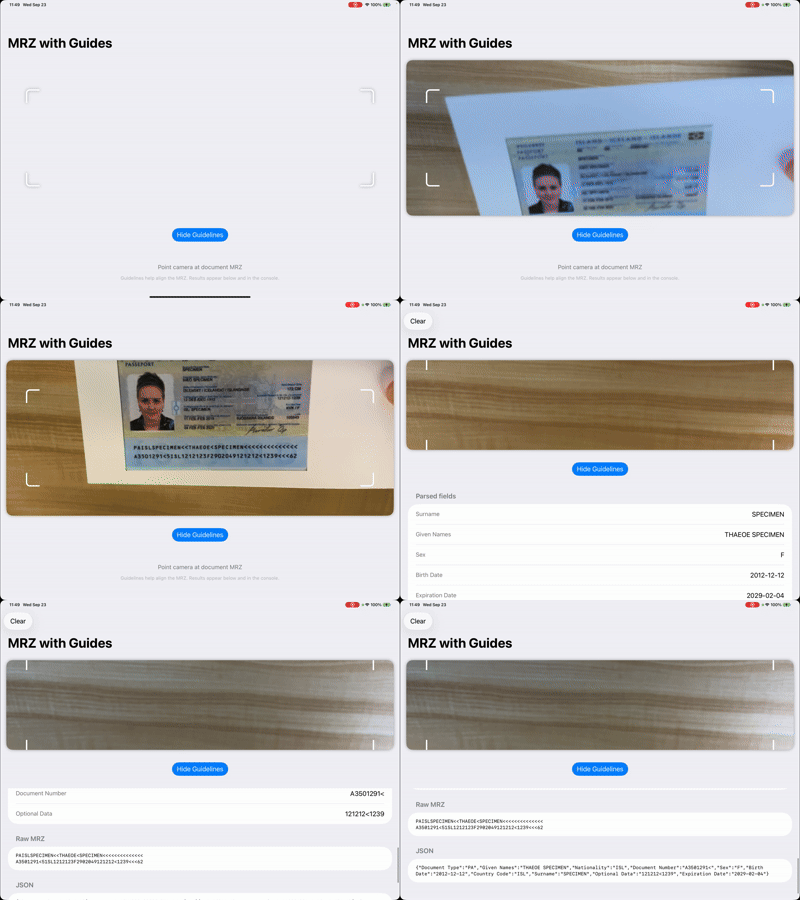
How it works
Guides on the capture view. AilaCaptureView has displayMRZGuides(_:). The wrapper calls it in makeUIView and again in updateUIView so a SwiftUI @Binding can drive it.
Reaching the UIKit view from SwiftUI. The wrapper has a Coordinator that keeps a reference to the AilaCaptureView. It is handed back to the parent through an externalCoordinator binding so the SwiftUI view can call reconnectSession(), displayMRZGuides(_:), and resetGuidanceText() directly. This is a general pattern for any AilaCaptureView method you need to call imperatively.
Reconnecting the session. In onAppear the view calls captureCoordinator?.reconnectSession(), which wraps reconnectAVCaptureSession(). This makes sure the preview attaches to the camera session after Aila_Start() has run, since SwiftUI may create the view before or after scanning begins.
//
//  Quickstart: MRZ with Guides – AilaCaptureView with MRZ guides
//

import SwiftUI
import AVFoundation
import Aila

struct AilaCaptureViewRepresentable: UIViewRepresentable {
    @Binding var showMRZGuides: Bool
    @Binding var externalCoordinator: Coordinator?

    class Coordinator {
        fileprivate var captureView: AilaCaptureView?

        func resetGuidanceText() {
            captureView?.resetGuidanceText()
        }

        func reconnectSession() {
            captureView?.reconnectAVCaptureSession()
        }

        func displayMRZGuides(_ shouldShow: Bool) {
            captureView?.displayMRZGuides(shouldShow)
        }
    }

    func makeCoordinator() -> Coordinator {
        let coordinator = Coordinator()
        DispatchQueue.main.async {
            externalCoordinator = coordinator
        }
        return coordinator
    }

    func makeUIView(context: Context) -> AilaCaptureView {
        let view = AilaCaptureView()
        context.coordinator.captureView = view
        view.displayMRZGuides(showMRZGuides)
        return view
    }

    func updateUIView(_ uiView: AilaCaptureView, context: Context) {
        context.coordinator.captureView = uiView
        uiView.displayMRZGuides(showMRZGuides)
    }
}
The view model matches MRZ Scanning: mrzMode = .on, check for .typeMRZ, parse the JSON in data.
MRZWithGuides/ViewModel.swift
//
//  Quickstart: MRZ with Guides – ViewModel
//  MRZ mode with camera preview. Same parsing as MRZ Scanning quickstart.
//

import Foundation
import Aila

/// Parsed MRZ result for display. SDK returns MRZ as JSON in `data`; optional `rawData` from AilaMRZScanObject.
struct MRZGuidesResult: Identifiable {
    let id = UUID()
    let rawData: String?
    let parsedFields: [(String, String)]
    let jsonString: String

    static func from(data: String, rawData: String?) -> MRZGuidesResult {
        var fields: [(String, String)] = []
        if let utf8 = data.data(using: .utf8),
           let dict = try? JSONSerialization.jsonObject(with: utf8) as? [String: Any] {
            let keys = [
                "Surname", "Given Names", "Sex", "Birth Date", "Expiration Date",
                "Nationality", "Country Code", "Document Type", "Document Number",
                "Optional Data", "Optional Data 2"
            ]
            for key in keys {
                if let value = dict[key] as? String, !value.isEmpty {
                    fields.append((key, value))
                }
            }
        }
        let effectiveRaw: String? = (rawData?.isEmpty == false) ? rawData : nil
        return MRZGuidesResult(rawData: effectiveRaw, parsedFields: fields, jsonString: data)
    }
}

final class MRZWithGuidesViewModel: ObservableObject {
    @Published private(set) var lastMRZResult: MRZGuidesResult?

    func startScanning() {
        Aila_Init()
        Aila_SetConfiguration(buildConfiguration())
        Aila_Start()
    }

    func stopScanning() {
        Aila_Stop()
    }

    func clearResult() {
        lastMRZResult = nil
    }

    private func buildConfiguration() -> AilaConfiguration {
        let config = AilaConfiguration()
        config.multiScanMode = .off
        config.beepVolume = .volume3
        config.mrzMode = .on

        config.setCode(.typeUPC, enabled: true)
        config.setCode(.typeEAN, enabled: true)
        config.setCode(.typeQR, enabled: true)
        config.setCode(.type128, enabled: true)
        config.setCode(.typePDF417, enabled: true)

        config.scanCallback = { [weak self] results in
            self?.handleScanResults(results)
        }

        return config
    }

    private func handleScanResults(_ results: [AilaScanObject]?) {
        guard let results = results, !results.isEmpty else { return }

        for obj in results {
            guard obj.type == .typeMRZ, let data = obj.data else { continue }

            let rawData: String? = (obj as? AilaMRZScanObject)?.rawData
            print("MRZ with Guides — data: \(data)")
            if let raw = rawData { print("MRZ with Guides — rawData: \(raw)") }

            let mrzResult = MRZGuidesResult.from(data: data, rawData: rawData)
            DispatchQueue.main.async { [weak self] in
                self?.lastMRZResult = mrzResult
            }
            break
        }
    }
}
The view binds showMRZGuides to both the wrapper and the toggle button.
MRZWithGuides/View.swift
//
//  Quickstart: MRZ with Guides – View
//  AilaCaptureView with MRZ guides on, toggle, and parsed result below.
//

import Foundation
import SwiftUI

struct MRZWithGuidesView: View {
    @StateObject private var viewModel = MRZWithGuidesViewModel()
    @State private var showMRZGuides = true
    @State private var captureCoordinator: AilaCaptureViewRepresentable.Coordinator?

    var body: some View {
        NavigationStack {
            VStack(spacing: 16) {
                AilaCaptureViewRepresentable(
                    showMRZGuides: $showMRZGuides,
                    externalCoordinator: $captureCoordinator
                )
                .cornerRadius(16)
                .padding()
                .shadow(radius: 4)

                Button(showMRZGuides ? "Hide Guidelines" : "Show Guidelines") {
                    showMRZGuides.toggle()
                }
                .buttonStyle(.borderedProminent)
                .padding(.bottom)

                if let result = viewModel.lastMRZResult {
                    mrzResultView(result)
                } else {
                    placeholderView
                }
            }
            .background(Color(.systemGroupedBackground))
            .navigationTitle("MRZ with Guides")
            .toolbar {
                if viewModel.lastMRZResult != nil {
                    ToolbarItem(placement: .cancellationAction) {
                        Button("Clear") {
                            viewModel.clearResult()
                        }
                    }
                }
            }
            .onAppear {
                viewModel.startScanning()
                DispatchQueue.main.async {
                    captureCoordinator?.reconnectSession()
                    captureCoordinator?.displayMRZGuides(showMRZGuides)
                }
            }
            .onDisappear {
                viewModel.stopScanning()
            }
        }
    }

    private func mrzResultView(_ result: MRZGuidesResult) -> some View {
        List {
            Section("Parsed fields") {
                ForEach(result.parsedFields, id: \.0) { key, value in
                    HStack(alignment: .top) {
                        Text(key)
                            .font(.subheadline)
                            .foregroundStyle(.secondary)
                        Spacer(minLength: 12)
                        Text(value)
                            .font(.body)
                            .multilineTextAlignment(.trailing)
                    }
                }
                if result.parsedFields.isEmpty {
                    Text("No fields parsed (or unlicensed). Raw data below.")
                        .foregroundStyle(.secondary)
                        .font(.subheadline)
                }
            }

            if let raw = result.rawData, !raw.isEmpty {
                Section("Raw MRZ") {
                    Text(raw)
                        .font(.system(.caption, design: .monospaced))
                }
            }

            Section("JSON") {
                Text(result.jsonString)
                    .font(.system(.caption, design: .monospaced))
                    .lineLimit(20)
            }
        }
        .listStyle(.insetGrouped)
    }

    private var placeholderView: some View {
        VStack(spacing: 12) {
            Text("Point camera at document MRZ")
                .font(.subheadline)
                .foregroundStyle(.secondary)
            Text("Guidelines help align the MRZ. Results appear below and in the console.")
                .font(.caption)
                .foregroundStyle(.tertiary)
                .multilineTextAlignment(.center)
                .padding(.horizontal, 24)
        }
        .frame(maxWidth: .infinity)
        .padding(.vertical, 24)
    }
}
Try changing
- Start with guides hidden and show them only after a few seconds without a read.
- Call
resetGuidanceText()from a button to see the default guidance prompt return.
API used
- AilaCaptureView for
displayMRZGuides,reconnectAVCaptureSession, andresetGuidanceText - AilaMRZScanObject
- AilaConfiguration for
mrzMode
Next: show the camera only when a document is present with MRZ Detection.
Want the code? The full Xcode project is available as a zip on the Quickstarts overview.