Multi-Scan
Multi-scan mode keeps the scanner running after each read so a user can sweep across several barcodes without tapping anything. This quickstart turns it on, adds a duplicate filter toggle, lists every result, and shows how to reset the session so the same codes can be read again.
Folder in the download: MultiScan/. Scheme: MultiScan. No camera preview.
What you'll see
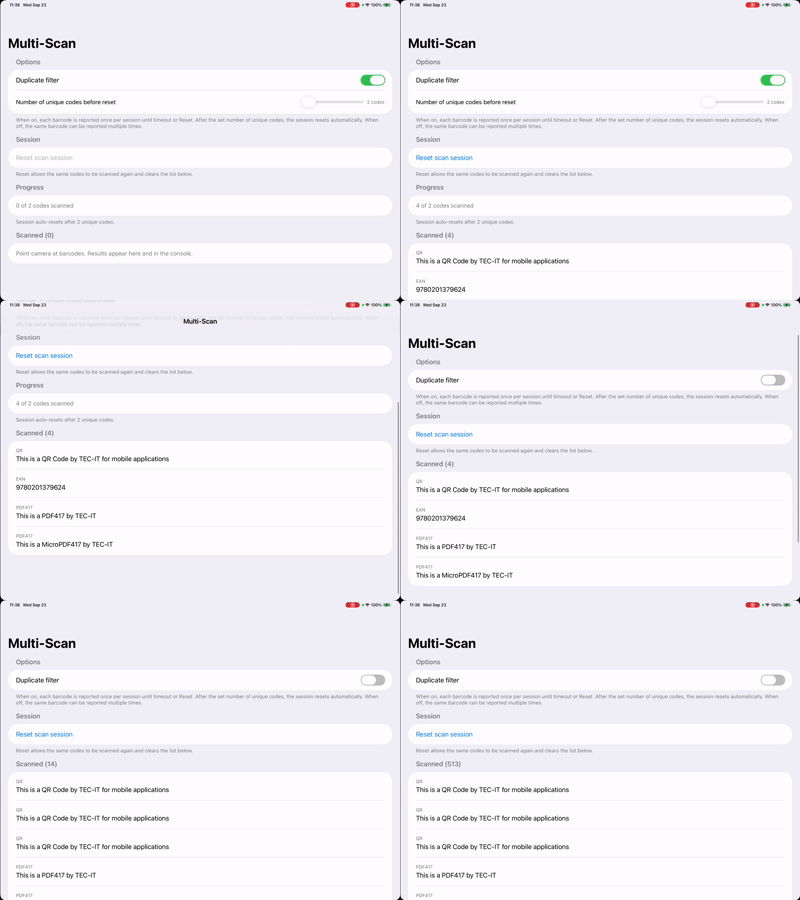
How it works
Enabling multi-scan. In buildConfiguration(), config.multiScanMode = .on keeps scanning after each result. config.duplicateFilter is set from the toggle: when .on, each distinct barcode is reported once per session; when .off, the same barcode can be reported repeatedly as long as it stays in view.
Reconfiguring at runtime. The duplicateFilterOn property has a didSet that calls applyConfiguration(). You can call Aila_SetConfiguration again while scanning is active. The SDK applies the new settings without a stop and start.
Resetting the session. Aila_ResetScan() clears the SDK's memory of what it has seen so previously scanned codes are reported again. The quickstart uses it in two places:
- The Reset scan session button calls it and clears the list.
checkUniqueCodesBeforeReset()calls it automatically, along withAila_Beep()as audible confirmation, once the list reaches the number set on the slider. The list is kept so the user can see what was collected.
Handling results. With multi-scan on, the callback array can contain more than one AilaScanObject, so handleScanResults iterates all of them.
//
//  Quickstart: MultiScan – ViewModel
//  Enables multiscan with optional duplicate filtering.
//

import Foundation
import Aila

struct ScannedItem: Identifiable {
    let id = UUID()
    let type: String
    let data: String
}

final class MultiScanViewModel: ObservableObject {
    @Published var duplicateFilterOn: Bool = true {
        didSet {
            guard oldValue != duplicateFilterOn else { return }
            applyConfiguration()
        }
    }

    /// Number of unique codes to collect before auto-reset. Only applies when duplicate filter is on. Range 2–20.
    @Published var uniqueCodesBeforeReset: Int = 2 {
        didSet {
            guard oldValue != uniqueCodesBeforeReset else { return }
            uniqueCodesBeforeReset = min(20, max(2, uniqueCodesBeforeReset))
        }
    }

    @Published private(set) var scannedItems: [ScannedItem] = []

    func startScanning() {
        Aila_Init()
        applyConfiguration()
        Aila_Start()
    }

    func stopScanning() {
        Aila_Stop()
    }

    func resetScanSession() {
        Aila_ResetScan()
        scannedItems.removeAll()
    }

    private func applyConfiguration() {
        let config = buildConfiguration()
        Aila_SetConfiguration(config)
    }

    private func buildConfiguration() -> AilaConfiguration {
        let config = AilaConfiguration()
        config.multiScanMode = .on
        config.duplicateFilter = duplicateFilterOn ? .on : .off
        config.beepVolume = .volume3

        config.setCode(.typeUPC, enabled: true)
        config.setCode(.typeEAN, enabled: true)
        config.setCode(.typeQR, enabled: true)
        config.setCode(.type128, enabled: true)
        config.setCode(.typePDF417, enabled: true)

        config.scanCallback = { [weak self] results in
            self?.handleScanResults(results)
        }

        return config
    }

    private func handleScanResults(_ results: [AilaScanObject]?) {
        guard let results = results, !results.isEmpty else { return }

        for obj in results {
            let data = obj.data ?? "no data"
            let type = obj.typeDescription() ?? "no type"
            print("MultiScan — type: \(type), data: \(data)")
        }

        DispatchQueue.main.async { [weak self] in
            guard let self else { return }
            for obj in results {
                let data = obj.data ?? "no data"
                let type = obj.typeDescription() ?? "no type"
                let item = ScannedItem(type: type, data: data)
                self.scannedItems.append(item)
            }
            self.checkUniqueCodesBeforeReset()
        }
    }

    /// When duplicate filter is on, reset SDK after reaching the target so more codes can be scanned. List is only cleared when user taps Reset.
    private func checkUniqueCodesBeforeReset() {
        guard duplicateFilterOn else { return }
        let count = scannedItems.count
        guard count >= uniqueCodesBeforeReset else { return }
        Aila_Beep()
        Aila_ResetScan()
    }

    /// Progress text when duplicate filter is on: "X of Y codes scanned".
    var multiScanProgressText: String? {
        guard duplicateFilterOn else { return nil }
        return "\(scannedItems.count) of \(uniqueCodesBeforeReset) codes scanned"
    }
}
The view is a List with a toggle, a slider bound to uniqueCodesBeforeReset, a reset button, and a section for results.
MultiScan/View.swift
//
//  Quickstart: MultiScan – View
//  No preview. Toggle duplicate filter, list results, reset scan session.
//

import Foundation
import SwiftUI

struct MultiScanView: View {
    @StateObject private var viewModel = MultiScanViewModel()

    var body: some View {
        NavigationStack {
            List {
                Section {
                    Toggle("Duplicate filter", isOn: $viewModel.duplicateFilterOn)
                    if viewModel.duplicateFilterOn {
                        HStack {
                            Text("Number of unique codes before reset")
                                .font(.subheadline)
                            Spacer()
                            HStack {
                                Slider(
                                    value: Binding(
                                        get: { Float(viewModel.uniqueCodesBeforeReset) },
                                        set: { viewModel.uniqueCodesBeforeReset = Int($0) }
                                    ),
                                    in: 2...20,
                                    step: 1
                                )
                                .frame(width: 160)
                                Text("\(viewModel.uniqueCodesBeforeReset) code\(viewModel.uniqueCodesBeforeReset == 1 ? "" : "s")")
                                    .font(.caption)
                                    .foregroundStyle(.secondary)
                            }
                        }
                        .padding(.vertical, 4)
                    }
                } header: {
                    Text("Options")
                } footer: {
                    Text("When on, each barcode is reported once per session until timeout or Reset. After the set number of unique codes, the session resets automatically. When off, the same barcode can be reported multiple times.")
                }

                Section {
                    Button("Reset scan session") {
                        viewModel.resetScanSession()
                    }
                    .disabled(viewModel.scannedItems.isEmpty)
                } header: {
                    Text("Session")
                } footer: {
                    Text("Reset allows the same codes to be scanned again and clears the list below.")
                }

                if viewModel.duplicateFilterOn {
                    Section {
                        Text(viewModel.multiScanProgressText ?? "")
                            .font(.subheadline)
                            .foregroundStyle(.secondary)
                    } header: {
                        Text("Progress")
                    } footer: {
                        Text("Session auto-resets after \(viewModel.uniqueCodesBeforeReset) unique code\(viewModel.uniqueCodesBeforeReset == 1 ? "" : "s").")
                    }
                }

                Section("Scanned (\(viewModel.scannedItems.count))") {
                    if viewModel.scannedItems.isEmpty {
                        Text("Point camera at barcodes. Results appear here and in the console.")
                            .foregroundStyle(.secondary)
                            .font(.subheadline)
                    } else {
                        ForEach(viewModel.scannedItems) { item in
                            VStack(alignment: .leading, spacing: 4) {
                                Text(item.type)
                                    .font(.caption)
                                    .foregroundStyle(.secondary)
                                Text(item.data)
                                    .font(.body)
                                    .lineLimit(3)
                            }
                            .padding(.vertical, 2)
                        }
                    }
                }
            }
            .navigationTitle("Multi-Scan")
            .onAppear {
                viewModel.startScanning()
            }
            .onDisappear {
                viewModel.stopScanning()
            }
        }
    }
}
Try changing
- Turn the duplicate filter off and hold a single barcode in view to see repeated reports.
- Remove the automatic reset in
checkUniqueCodesBeforeReset()and rely only on the button. - Group results by
typebefore displaying them.
API used
- Aila_ResetScan
- Aila_Beep
- AilaConfiguration for
multiScanModeandduplicateFilter - Aila_Init, Aila_SetConfiguration, Aila_Start, Aila_Stop
Next: read travel documents with MRZ Scanning.
Want the code? The full Xcode project is available as a zip on the Quickstarts overview.